
Qt Creator
Syntax Highlighting
Section titled “Syntax Highlighting”Qt Creator supports the same format as Kate. Refer to the instructions for Kate to set up syntax highlighting.
To install the Slint Language server, check the LSP Documentation.
To setup the lsp:
- Install the
slint-lspbinary - Then in Qt creator, go to Tools > Option and select the Language Client section.
- Click Add
- As a name, use “Slint”
- use
*.slintas a file pattern. (don’t use MIME types) - As executable, select the
slint-lspbinary (no arguments required) - Click Apply or Ok
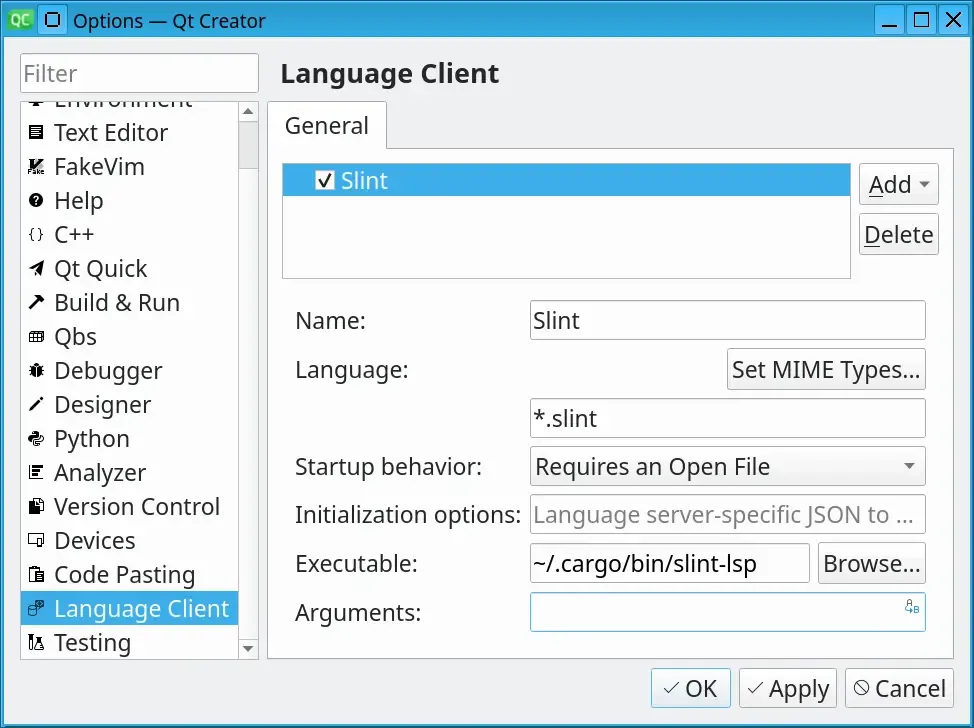
Live Preview
Section titled “Live Preview”Once you have set up the LSP, in order to preview a component, when you have a .slint file open, place your cursor to the name of the component you would like to preview and press Alt + Enter to open the code action menu. Select Show Preview from that menu.
© 2026 SixtyFPS GmbH